In short: domain + builder + five pages + good phone photos. Everything below is the detail behind those four steps, with 2026 prices verified in July 2026.
Why your home bakery needs a website (and when you can skip it)
A home bakery website is a business asset you own; Instagram is a marketing channel you rent. The difference matters because:
- You own the website. Instagram can change its algorithm tomorrow and hide 90% of your posts from your own followers. Your website at your own domain stays exactly the way you built it.
- Google sends customers. "Birthday cake near me" returns websites, not Instagram profiles. A real site gets indexed and shows up in local search; a profile rarely does.
- Trust scales. Customers ordering a $200 wedding cake want to see a website with photos, menu, and pricing — not just a DM exchange.
- One link covers everything. Your business card, your Instagram bio, your Etsy listing — all point to one URL where customers can find every flavor, every photo, and the order form.
When you can skip it: if you only bake for friends and family, or you take fewer than 5 orders a month and they all come from people who already know you. Below that threshold the time investment isn't worth it. Above that, it pays for itself in the first month.
How to make a bakery website: the four decisions
Learning how to make a bakery website is not a design problem — it's four decisions and an afternoon of typing. A bakery website is a five-page site at your own .com that shows what you bake, what it costs, and how to order it. That's the whole definition.
- Your domain name —
[yourbakery].com— register this once a year. - Where to register it — Namecheap, GoDaddy, or one of a few others.
- The website builder — Squarespace, Square Online, Wix, or Shopify.
- The five core pages — Home, Menu, Order, About, Contact.
| Decision | Default answer for a home bakery | 2026 cost |
|---|---|---|
| Domain registrar | Namecheap | $6.49 year one, $14.58 renewal |
| Builder | Squarespace Basic (or Square Online free) | $16/mo annual (or $0) |
| Order intake | Google Form embedded on an Order page | Free |
| Photos | Phone + $30 lightbox | ~$30 one time |
| Year-one total | ~$200 |
That's it. The rest is choosing photos and writing the words. If you're still deciding what to sell and where, start with how to sell baked goods online from home — the website is one channel inside that bigger picture.
Choosing your domain name
Rules that matter:
- Use
.comif you possibly can. Not.bakery, not.shop, not.biz. Customers still type.comby reflex. If your name is taken, change your name before you switch extensions. - Keep it short. Under 18 characters total.
sweetlinebakes.com(15) is great.sarahssweettreatsandcakes.com(28) is forgettable. - Easy to spell over the phone. If you say it to someone, they should type it correctly without follow-up. Avoid double letters, silent letters, and creative spellings ("Bakerz" is a no).
- Skip numbers and hyphens.
cakes4u.comlooks dated.the-sweet-spot.comis hard to remember. - Check trademark conflicts. Search the US PTO database (free) for your proposed name in food/bakery categories. A 30-second search now prevents a cease-and-desist letter later.
If your first choice is taken, try:
- Adding your city:
austinsweetlinebakes.com - Adding "co":
sweetlinebakeco.com - A simple modifier:
mysweetline.comorgetsweetline.com
Don't pay a "domain broker" to negotiate the purchase of a taken name. It's almost always a scam targeting bakeries that haven't bought a domain before.
Where to buy the domain: Namecheap vs GoDaddy
These two cover ~80% of the domain registration market. They're not equivalent. The short version: Namecheap wins on price; GoDaddy wins if you absolutely need phone support.
The comparison
| Feature | Namecheap | GoDaddy |
|---|---|---|
| .com first year | $6.49 | $0.01 (promotional, multi-year required) |
| .com renewal | $14.58/yr | $19.99/yr+ |
| WhoisGuard / privacy | Free, forever | Paid add-on (~$10/yr) |
| Hosting starts at | $1.58/month | $5.99/month |
| TLDs offered | 519 | 554 |
| Support | 24/7 live chat (no phone) | 24/7 phone + chat in 15+ languages |
| Default security on hosting | Basic on entry tier | Strong across all tiers |
| Best for | Cost-conscious founders | Buyers who want a US phone line |
What this means for a home bakery
Pick Namecheap if: you're price-conscious, you're comfortable troubleshooting via chat or email, and you want the domain privacy (WhoisGuard) bundled in. For most home bakeries this is the right call. Total year-one cost: ~$6.49 domain + ~$60 basic hosting if you use theirs = $66.49.
Register a domain at Namecheap →
Pick GoDaddy if: you want to call a human at 2am when something breaks, or you want to take advantage of the $0.01 promotional first year on a multi-year commitment (just understand renewals jump to $20+/year). Their site builder is also genuinely beginner-friendly if you'd rather skip Squarespace entirely.
Register a domain at GoDaddy →
The "free domain for the first year with hosting" offer on both sites looks generous but locks renewal of the domain to that hosting provider — moving the domain elsewhere later is harder. If you're sure about hosting choice, the bundle saves money. If you're not, register the domain separately.
Which website builder to use (the short version)
The domain is just the address; the builder is the house. For a home bakery selling locally, Squarespace is the default answer and Square Online is the free answer. Prices below are annual-billing rates as of July 2026.
| Builder | 2026 entry price | Pick it when |
|---|---|---|
| Square Online | Free tier (3.3% + 30¢ per online transaction) | You want to spend $0 and already take card payments |
| Squarespace Basic | $16/mo annual ($25 monthly) | You want it to look professional with zero design work |
| Squarespace Core | $23/mo annual ($39 monthly) | You need built-in commerce and appointment booking |
| Wix Light | $17/mo annual — note: no online checkout on this tier | You want drag-and-drop design without selling online |
| Wix Core | $29/mo annual | You want drag-and-drop and a real checkout |
| Shopify Basic | $39/mo monthly ($29/mo annual) | You ship cookies or packaged goods nationally |
Squarespace renamed its plans in 2025 — the old "Personal" tier is now Basic, and "Business" is now Core. If an older guide quotes Personal at $16, that's the plan now called Basic.
Don't use WordPress unless you (or a friend) actually enjoy web development. It's powerful but requires real maintenance — security updates, plugin conflicts, backup management. Squarespace and Square Online handle all of that invisibly.
That's as far as this guide goes on builders. If you want the full breakdown — real transaction fees, which platforms handle pickup windows and order cutoffs, and what it costs to switch later — read Best Bakery Website Builders 2026: 6 Platforms Compared. Otherwise, the rest of this post assumes you've picked one and want to get the site live.
The five pages every bakery website needs
Skip the marketing fluff — these five pages cover 95% of what a customer ever needs:
- Home. One photo (your best one), your bakery name, your tagline, a single "See the Menu" button. Don't overcomplicate this — a customer should know what you sell and how to order within 5 seconds.
- Menu. Categorized list (Cakes / Cookies / Bread / Custom Orders) with photos, descriptions, and base prices. "Custom cakes from $65" is enough — you don't need to list every possible flavor combination.
- Order. Embedded order form (Google Forms is fine to start), pricing notes, lead-time requirements ("Custom cakes need 7 days notice"), and cancellation policy.
- About. Your story in 2–3 short paragraphs. Where you're based, why you started, what makes your bakes different. One photo of you (not just product photos).
- Contact. Email, optional phone, service area (which neighborhoods/cities you deliver to), pickup address (or "Address provided after order confirmation" if you'd rather not publish your home).
Optional sixth page if you take wedding/event work: Gallery with 10–20 of your best decorated cakes. Skip this if your bake style is mostly standard menu items.
The legal text most bakery websites forget
Cottage food operations in most states must disclose two things at the point of sale — and your website is a point of sale. Put both in the footer or on the Order page:
- The cottage food statement. Wording is set by your state (California, for example, requires "Made in a Home Kitchen" on the label). Check the exact phrase for your state in our cottage food laws by state guide.
- Allergen disclosure. The FDA's Food Allergen Labeling and Consumer Protection Act names nine major allergens — milk, eggs, fish, shellfish, tree nuts, peanuts, wheat, soybeans, and sesame. A one-line note ("Baked in a home kitchen that also handles wheat, eggs, dairy, tree nuts, and soy") covers you and pre-empts the question customers would otherwise email you.
The same information belongs on the physical package too — see how to label cottage food baked goods for the label layout.
Taking great product photos (no DSLR required)
Your phone camera is good enough. The lighting isn't. The single highest-leverage upgrade for a non-photographer bakery website is a small photography lightbox — turns your kitchen counter into a controlled studio for under $30:
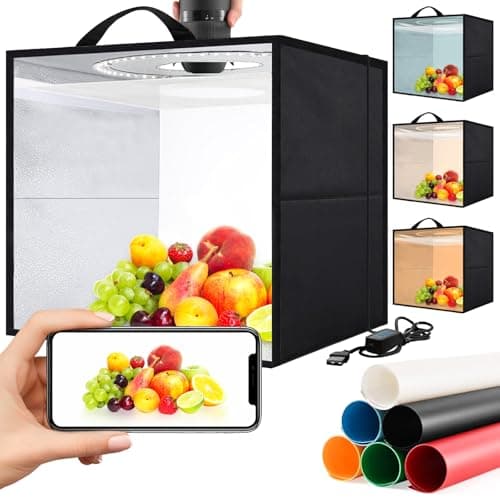
Heimekite Light Box,Light Box Photography,16"x16"Photo Box,Photo Light Box,Product Photography Light Box with CRI >95,120 LEDs Lights,6 Photo Backdrops for Product Display
Packaging
- High Brightness:Our 16"x16"mini photo booth features 120 high-quality LED light beads,provides enough brightness for shooting.
- 6 Color Backdrops:Our photo studio light box included 6 detachable backgrounds (White/Black/Blue/Green/Red/Orange) made of thick PVC,making it effortless to change background colors and create various shooting scenes.
- Easy to assemble:No brackets, screws, or complicated lighting layouts required.Use it after three seconds of assembly, you can unfold this LED photo studio light box.
How to use it:
- Set the lightbox on your counter near a window (natural light + the LED box = best results).
- Place a clean white or cream-colored backdrop sheet inside (included in most kits).
- Set the cake/cookie/loaf on the backdrop, centered.
- Shoot from your phone, slightly above the product, never at the same height (looks flat).
- Crop tight in your phone's photo editor — fill the frame with the product, not the table.
Take 5 shots per item from different angles. Upload to the menu page. Your bake will look the same caliber as competitors paying $300 for professional product photography.
The weekend timeline: zero to live in 48 hours
A realistic schedule that ships a real website by Sunday evening:
Saturday morning (2 hours)
- Research and register your domain at Namecheap or GoDaddy. (30 min)
- Sign up for Squarespace (14-day free trial) or Square Online. Pick a food/restaurant template. (30 min)
- Replace template text with your bakery's name, tagline, and "About" paragraph. (60 min)
Saturday afternoon (3 hours)
- Photograph your top 8–10 menu items in the lightbox. (90 min)
- Edit photos in your phone (crop, brighten, adjust contrast). (30 min)
- Upload to Squarespace, build the Menu page with photos + names + base prices. (60 min)
Sunday morning (2 hours)
- Create a Google Form for orders (item, flavor, size, pickup date, contact info, allergens). (45 min)
- Embed the form on a new "Place an Order" page. (15 min)
- Write the About page (3 paragraphs) and Contact page. (60 min)
Sunday afternoon (1–2 hours)
- Connect your Namecheap/GoDaddy domain to Squarespace via the DNS settings (they have a guided wizard). (30 min)
- Test all five pages on your phone and laptop. Fix typos and broken links. (60 min)
- Hit Publish. Share the link to your Instagram bio and to friends/family for feedback.
That's it. The whole project is two days, ~$200 in year-one costs, and you now own a permanent business asset that works while you sleep.
Common beginner mistakes
- Overdesigning. Pick one template, change the photos, change the text, ship it. Don't spend three weekends fine-tuning fonts.
- Listing every possible flavor. Customers don't read flavor lists of 40 items. Categorize: 4 cake flavors, 6 cookie types, 3 bread types. Add "+ custom flavors on request" as a footnote.
- Hiding the prices. "Contact for pricing" is the second-fastest way to lose a customer (first is "Coming soon"). Publish at least starting prices: "Custom cakes from $65, cookies from $24/dozen." Customers self-qualify; you stop fielding tire-kicker emails.
- No mobile preview. 70%+ of bakery site visitors are on phones. After publishing, open every page on your phone and fix anything that looks cramped.
- Forgetting to renew the domain. Set a calendar reminder for 11 months out, before the auto-renewal hits. If you let it expire, someone can buy your name and sell it back to you for hundreds.
SEO basics: showing up on Google
The whole topic is its own book — but four things every home-bakery website should do:
- Use a clear page title and description on every page. Squarespace asks for these in the page settings. "Cake Menu — Sweet Line Bakery, Austin TX" beats "Menu Page."
- Mention your city/region in the home page and About page text. Local search is how nearby customers find you.
- Add your bakery to Google Business Profile (free). Takes 10 minutes. The single highest-leverage SEO action a local home bakery can take — it's what puts you in Google Maps and the three-result local pack. You can list a service area instead of publishing your home address.
- Get one review on Google Business per month. Ask happy customers directly. Google's own local ranking documentation lists relevance, distance, and prominence as the ranking factors — reviews feed prominence, and they're the only one you control.
- Name the city in your page titles. "Custom Cake Menu — Sweet Line Bakery, Austin TX" beats "Menu." Do this once per page and you've done most of what a local SEO consultant would charge $500 for.
That's enough SEO for year one. Add more sophisticated tactics only after you're getting consistent orders.
What to do next
- How to take orders for a home bakery: workflow & tools — the order-intake system to wire into your new website.
- How to price baked goods: a cottage bakery formula — what to actually list as prices on the Menu page.
- How much does it cost to start a home bakery? Real 2026 numbers — where website costs fit in the overall startup budget.
Related reading
- Best bakery packaging for small businesses — the physical brand that should match your website's look.
- Essential baking tools for starting a home bakery — the production side once the customers start finding you.
- Cottage food laws by state: 2026 guide for bakers — what your state requires you to disclose on the site and on the box.
Affiliate disclosure
Baker Setup is reader-supported. When you buy through links on our site, we may earn an affiliate commission at no extra cost to you. We only recommend products we've researched against the field — never sponsored placements.