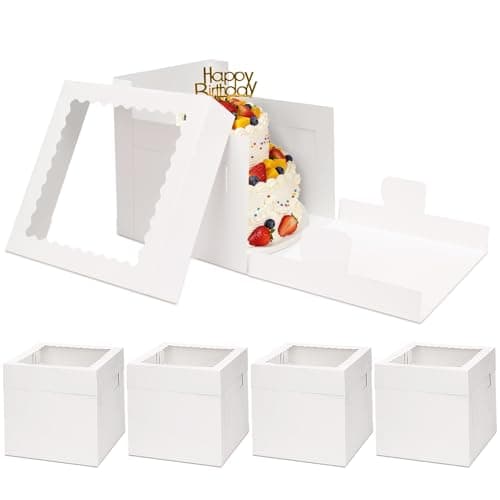
Why most order systems break at 10 orders/week
The first 5 orders feel manageable in DMs. By order 10 you're missing pickup times, double-booking weekends, and arguing about whether the customer wanted vanilla or almond. The breakdown isn't bakery skill — it's that you're running a business with no system.
The fix isn't expensive software. It's three things, in this order:
- A single intake channel (one form, not DMs across three platforms).
- A payment process that runs before you bake (deposit minimum).
- A scheduling system that you and the customer both see.
Skip any one and you'll spend more time on customer service than baking.
The intake form
One link. One source of truth for what was ordered. Free tier of any of these works:
- Google Forms — free, instant. Send the link in your Instagram bio + reply DMs with it. Responses flow into a Google Sheet you sort by pickup date.
- Typeform / Jotform — prettier, conditional logic ("if you select 'wedding cake' → ask for guest count"). Free tier covers small volume.
- Your own website form — best long-term but adds friction setting up. Skip until you're past the first 50 orders.
Required fields:
- Customer name + phone + email
- Item type + flavor + size
- Pickup or delivery date (date picker, not free-text)
- Pickup time window or delivery address
- Allergens, dietary restrictions
- Reference photo upload (image field — critical for custom cakes)
- A note acknowledging the cancellation/deposit policy
Confirm every submission with a templated reply within 24 hours. "Got it. Confirming you'd like a 6-inch vanilla buttercream with the topper shown, pickup Saturday 5/9 between 10am–noon. Deposit invoice on its way."
Payment: deposit before the oven turns on
The single highest-leverage rule for a home bakery: no ingredients buy without payment in hand. Customers cancel. Custom items can't be resold. Every cancellation without a deposit is straight loss.
Tier the deposit by order size:
| Order total | Deposit | When due |
|---|---|---|
| Under $50 | 100% | At order confirmation |
| $50–$200 | 50% | At order confirmation; balance at pickup |
| $200+ (custom / wedding) | 100% | At order confirmation, non-refundable within 7 days of pickup |
Payment platforms that work for small bakeries:
- Square — best all-in-one. Free reader, sends invoices, takes cards online, handles in-person tap. Fees: 2.6% + $0.10 per swipe. Setup time: under an hour.
- Stripe — for online-only. Integrates with your form via Zapier.
- Venmo / Zelle / Cash App — zero fee but no formal record. Fine for the first 20 orders, mess at tax time. Switch when you outgrow them.
Always send a receipt — Square does this automatically. Keep them; they're tax-deductible cost-of-goods documentation.
Scheduling: one calendar, both sides see it
The single most common error is over-promising the same day to two customers. The fix is one calendar, kept ruthlessly current:
- Google Calendar — free, shareable, recurring events for prep tasks. Free tier handles everything. Block off "BAKE" and "DECORATE" slots like meetings — when they're full, the day is full.
- Calendly + Google Calendar — let customers book pickup slots themselves. Calendly free tier handles one calendar; pulls availability automatically from your existing Google Calendar.
Set hard limits on your order form: "Maximum 8 cakes per weekend." When the slot is full, the form should say so. Don't accept overflow — saying no on the form is easier than saying no after they've sent you their kid's photo.
Packaging and pickup logistics
Your packaging line should be staged before the bake starts, not assembled at the last second:
For sizing the box to the order, see the cake box sizing guide. For the broader packaging line (cookie bags, kraft window boxes, labels), see best bakery packaging for small businesses.
Pickup workflow that prevents 90% of pickup-time problems:
- Label every box with the customer's first name + phone last 4 digits on a sticker — never leave a box unlabeled on the pickup table.
- Send a "Your order is ready" SMS the morning of pickup with the address and exact time window.
- Have a clearly marked pickup zone — not the front door, not your kitchen. A folding table on the porch with bagged orders by name works fine.
- Take a photo of every finished cake before pickup. If anything goes wrong in transport, you have proof of what left your hands.
When to add a thermal label printer
If you ship orders (not just local pickup), a thermal label printer pays for itself faster than any other piece of business equipment:
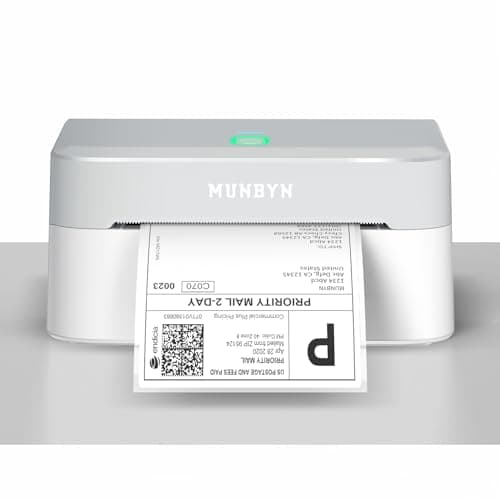
MUNBYN Bluetooth Thermal Label Printer RW403B, Wireless 4x6 Shipping Label Printer for Small Business, Compatible with Android, iPhone, Windows, Mac, Chromebook, Print Width 1.57"-4.25" (Grey)
Packaging
- VERSATILE LABEL SIZES FOR MORE USES: Print a wide range of direct thermal labels from 1.57" to 4.25" wide, giving you the flexibility to handle everything from shipping and return labels to product labels, inventory tags, barcodes, and everyday organization. One compact printer for packing orders, running a small business, crafting, and more
- Save on Long-Term Costs: Designed as a thermal printer, it lasts up to 970,000 labels—six times more than ordinary devices. Its professional-grade engineering ensures a near-zero jam rate (<0.01%), maximizing productivity while minimizing waste and errors, saving you money long-term.
- DAC Dynamic Algorithm Tech: As the first thermal shipping label printer with a 4-inch DAC chip, it auto-calibrates to reduce label misalignment and delivers precision for flawless packaging and shipping labels. When connecting a printer to a Mac/Windows computer, the Bluetooth indicator light will only illuminate during data transfer. When the indicator light turns off, the connection is stable
Works with USPS, UPS, FedEx, and DHL labels. Connects via Bluetooth or USB to your phone or laptop. Print directly from Pirate Ship, ShipStation, or the carrier app — no toner, no ink, no curling paper labels.
- Capacity: Prints 4×6-inch shipping labels at ~60 labels per minute
- Pros: No ink/toner ever. Direct thermal means the label cost is just the label roll (~$0.05 each in bulk). Works with every major carrier.
- Cons: Won't print color or non-label documents. Bluetooth pairing is finicky on first setup.
Buy this if you ship 4+ orders per week. Below that, hand-writing labels is faster than the setup overhead. Above that, the time savings compound fast.
Pricing the order before you confirm
Every order intake should hit your pricing system before you say yes. Quoting on instinct produces the "I worked 6 hours and made $40" experience that kills home bakeries. For the actual formula, see how to price baked goods: a cottage bakery formula — read it once, build a quick reference, and run every quote through it before you reply.
What to do next
- How to price baked goods: a cottage bakery formula — what to actually charge for the orders you're now taking.
- How much does it cost to start a home bakery? Real 2026 numbers — the budget context for the tools above.
Related reading
- Best bakery boxes for cakes: sizing guide — the packaging decision once orders start coming in.
- Essential baking tools for starting a home bakery — the gear you need on the production side.
Affiliate disclosure
Baker Setup is reader-supported. When you buy through links on our site, we may earn an affiliate commission at no extra cost to you. We only recommend products we've researched against the field — never sponsored placements.